27/04/2015
today i had to do my crest design
here is the outcome of the crest:
i did have to redo the wings as something went wrong with them when applying the colours and the new version came out better than before
28/04/2015
title colours
blue outline 1- 6668e8
green outline 2 - #24a844
dark green shadow - 2f752d
today i continued with my ui adding more titles and slides ready for interaction so far i'm up to 14 slides, they are interacting well and has the parts it needs, i am trying to create the tiles for certain slides and will imply them to the slides
just incase anyone needs a reminder of how to make the titles interactable
1. select the item you want to be a button
2. under "insert" select "action"
3. select hyperlink to (if you want it to go to another slide)
4. select the option you want
5. profit
29/04/2015
today i was adding animations to my ui making them interactable and making them able to go to the required slides,
Wednesday, 29 April 2015
Wednesday, 22 April 2015
20-22/04/2015
20/04/2015
Today I did some of my in-game interface in photoshop, the results came out the way i wanted it to
the design did change a little bit but all the other results were pretty much good
21/04/2015
today I tried putting my animation into game maker, the results didn't turn out ok, it seems I need to either rework the numbers or edit the sprite sheet in another piece of software
How to put an animation into game maker
1. create a sprite
2. go to edit sprite
3. under file, select "create from strip"
4. select the sprite sheet you want to use
5. start to edit the options till you get the result you want
here was the first outcome for my sprite sheet edit
frame 1
it looked ok in the first frame, Fitz was in an a good-ish position just a little bit more to the right than what i wanted
frame 3
unfortunately when i was moving along the frames Fitz was moving towards the left
frame 8
in the end one of the fitz frames came onto the right side and it ended up in complete failure
luckily we found out that we don't have to worry about sprite sheets until phase 3
22/04/2015
colour theory
what is colour?
colour is the property possessed by an object of producing different sensations on the eye as a result of the way it reflects or emits light
transparent
the light hits the object and comes out the otherside
translucent
the light hits the object, one or more rays come out but others will bounce back
opaque
the light does not go trough at all but just bounces off the object
the first diagram of colours was made by Isaac newton in 1666
in the 18th century onwards the colour wheel was used to create colour patterns and schemes that worked in harmony
monochromatic
selecting one single colour of the wheel and using various saturations
analogous
used in creating calm and comfortable moods, frequently found in nature
triadic
three colours that are equally distributed from each other, it is the most difficult to pull off as they compete against each other, best used in cartoons
complementary
most popular harmony, colours that naturally go well together, one misuse is to use equal amounts
split complementary
taking a complementary colour harmony and splitting on side of it, good for extending palette
double complementary
like split complementary but on both sides, can be tricky to use if using equal amounts
today we also started to make a prototype of our interface in power point, just to show how it will work and interact, so far most of what I wanted was coming out well but I am now trying to make stars turn when you hover over an option, I have got them to spin but I am trying to figure out how to make them only do it when an option is being hovered over.
to make the titles interactable
1. select the item you want to be a button
2. under "insert" select "action"
3. select hyperlink to (if you want it to go to another slide)
4. select the option you want
5. profit
Today I did some of my in-game interface in photoshop, the results came out the way i wanted it to
the design did change a little bit but all the other results were pretty much good
21/04/2015
today I tried putting my animation into game maker, the results didn't turn out ok, it seems I need to either rework the numbers or edit the sprite sheet in another piece of software
How to put an animation into game maker
1. create a sprite
2. go to edit sprite
3. under file, select "create from strip"
4. select the sprite sheet you want to use
5. start to edit the options till you get the result you want
here was the first outcome for my sprite sheet edit
frame 1
it looked ok in the first frame, Fitz was in an a good-ish position just a little bit more to the right than what i wanted
frame 3
unfortunately when i was moving along the frames Fitz was moving towards the left
frame 8
in the end one of the fitz frames came onto the right side and it ended up in complete failure
luckily we found out that we don't have to worry about sprite sheets until phase 3
22/04/2015
colour theory
what is colour?
colour is the property possessed by an object of producing different sensations on the eye as a result of the way it reflects or emits light
transparent
the light hits the object and comes out the otherside
translucent
the light hits the object, one or more rays come out but others will bounce back
opaque
the light does not go trough at all but just bounces off the object
the first diagram of colours was made by Isaac newton in 1666
in the 18th century onwards the colour wheel was used to create colour patterns and schemes that worked in harmony
monochromatic
selecting one single colour of the wheel and using various saturations
analogous
used in creating calm and comfortable moods, frequently found in nature
triadic
three colours that are equally distributed from each other, it is the most difficult to pull off as they compete against each other, best used in cartoons
complementary
most popular harmony, colours that naturally go well together, one misuse is to use equal amounts
split complementary
taking a complementary colour harmony and splitting on side of it, good for extending palette
double complementary
like split complementary but on both sides, can be tricky to use if using equal amounts
today we also started to make a prototype of our interface in power point, just to show how it will work and interact, so far most of what I wanted was coming out well but I am now trying to make stars turn when you hover over an option, I have got them to spin but I am trying to figure out how to make them only do it when an option is being hovered over.
to make the titles interactable
1. select the item you want to be a button
2. under "insert" select "action"
3. select hyperlink to (if you want it to go to another slide)
4. select the option you want
5. profit
Wednesday, 15 April 2015
13-15/04/2015
13
Today we edited the world to make sure everything was working, quickly made some collisions for the lava and moved the collisions part into its own folder to conserve space in the outliner and so everything is together.
14
Today we was renaming things in the world so it would be easier for us to know which ones it is and getting some renders, as well as making sure everything works (again), I also quickly did a new starting state for the volcano, so when the animation of the world plays the volcanos lava will already be flowing and because of it having a certain amount of life when it will be flowing till a certain point and will disappear.
15
Today I quickly made sure the characters colors were the same before making the sprite sheets, I need to edit them inside something like Photoshop because game maker does something wrong when making the sprite sheet into a sprite.
Wednesday, 25 March 2015
FMP 23-25/03/2015
FMP 23/03/2015
today we was tasked with completing our animations and exporting our assets into gamemaker, due to a problem i may have to rethink the losing pose. flash sometimes goes into a fatal error and crashes, this puts my production of animation behind a little if this continues to happen.
since my version of Fitz's face was the only one different to the others i have to use a team member's version of the face, and i have to resize it a little.
here is the before and after shot
before:
you can see that he has an unhappy face
after:
you can see that now he has a more angrier face
also it turns out the old colours was the right colours so i now have to use the old colours for future animations
FMP 24/03/2015
today I re-worked on the losing pose and instead of the idea of making him cry (since his arms were to short) I made him have sort of a hissy fit action
here is the final product:
FMP 25/03/2015
today I started to make my animations into files to use for gamemaker, I had an issue with making the layers into a movie clip, thanks to a website I managed to find some sort of fix
here are the steps:
today we was tasked with completing our animations and exporting our assets into gamemaker, due to a problem i may have to rethink the losing pose. flash sometimes goes into a fatal error and crashes, this puts my production of animation behind a little if this continues to happen.
since my version of Fitz's face was the only one different to the others i have to use a team member's version of the face, and i have to resize it a little.
here is the before and after shot
before:
you can see that he has an unhappy face
after:
you can see that now he has a more angrier face
also it turns out the old colours was the right colours so i now have to use the old colours for future animations
FMP 24/03/2015
today I re-worked on the losing pose and instead of the idea of making him cry (since his arms were to short) I made him have sort of a hissy fit action
here is the final product:
FMP 25/03/2015
today I started to make my animations into files to use for gamemaker, I had an issue with making the layers into a movie clip, thanks to a website I managed to find some sort of fix
here are the steps:
- on your main time line select all of the layers that you want to be in your new movie clip
- right click anywhere on the timeline and select 'copy frames'
- go to the 'insert' menu and select 'new symbol'
- select 'movie clip' then hit 'ok'
- right click on the first frame of the new movie clip and select 'paste frames'
- that should do it. go back to the main stage, the new movie clip will now be in your library. You can delete all the old layers from the stage if you want.
Wednesday, 18 March 2015
16-18/03/2015
16th
today i made the jumping animation just to test the bone tool
FMP 17/03/2015
today our class was told to keep a consistency of colours, so to make sure that all our Fitz models was right we checked that we had the same colours, I had the wrong colours so I changed the RGB values to theirs and moved the sliders to make sure the colours was the same as theirs, as 3 parts of the body had the gradient going a different way to the others.
we also was given the roles of making the different poses
me - victory and defeat pose
paige -
jake - blocking and hurt
here are pictures for comparison
old colours:
new colours:
as you can see the greens have gotten lighter and the gradient is in the right places
FMP 18/03/2015
today I finished making the wining animation, this is how it looks so far
Our team member jake hadn't come in again because he is ill, because of this there has been a lack of communication as only me and Paige are communicating, also Paige had done the attack pose
today i made the jumping animation just to test the bone tool
FMP 17/03/2015
today our class was told to keep a consistency of colours, so to make sure that all our Fitz models was right we checked that we had the same colours, I had the wrong colours so I changed the RGB values to theirs and moved the sliders to make sure the colours was the same as theirs, as 3 parts of the body had the gradient going a different way to the others.
we also was given the roles of making the different poses
me - victory and defeat pose
paige -
jake - blocking and hurt
here are pictures for comparison
old colours:
new colours:
as you can see the greens have gotten lighter and the gradient is in the right places
FMP 18/03/2015
today I finished making the wining animation, this is how it looks so far
Insert picture
Our team member jake hadn't come in again because he is ill, because of this there has been a lack of communication as only me and Paige are communicating, also Paige had done the attack pose
Wednesday, 11 March 2015
09-11/03/2015
today I was making the rest of the character making it ready for animating as well as giving it some color, so far this is what the character looks like, I used a gradient to make the colors of the characters body
FMP 10/03/2015
today I quickly made some small changes to my character making sure that all the body parts would be right for animating, so far this is the design I have of our character. many of the changes included the belly being an separate part, the part connecting the bulb to the body is more thicker and compressed it a bit as well as changing the arms a little so when they are animated then it wouldn't look as bad. also I arranged the body parts into the appropriate layers so they would look more better and you wouldn't see the points sticking out (also just to state the mouth only looks like that temporarily, I will make a better look for it one I have done some animating).
now I am onto the animation stage, so far I have imported our character into flash an is now ready for animating
FMP 11/03/2015
today we started to do some basic animating and made our characters body parts move. so far I played around with the bone tool and made our characters arms and legs move.
FMP 11/03/2015
today we started to do some basic animating and made our characters body parts move. so far I played around with the bone tool and made our characters arms and legs move.
Wednesday, 4 March 2015
FMP 02-04/03/2015
FMP 02/03/2015
today we were making the user interface as well as talking about the different types of HUDs
types of HUDs
diegetic HUD
a diegetic HUD is a HUD that exists within the game world, this means that players can interact with it in some kind of way. An example of this kind of HUD is Dead Space, the HUD is a projection in front of the players model allowing them to interact with it.

non-diegetic HUD
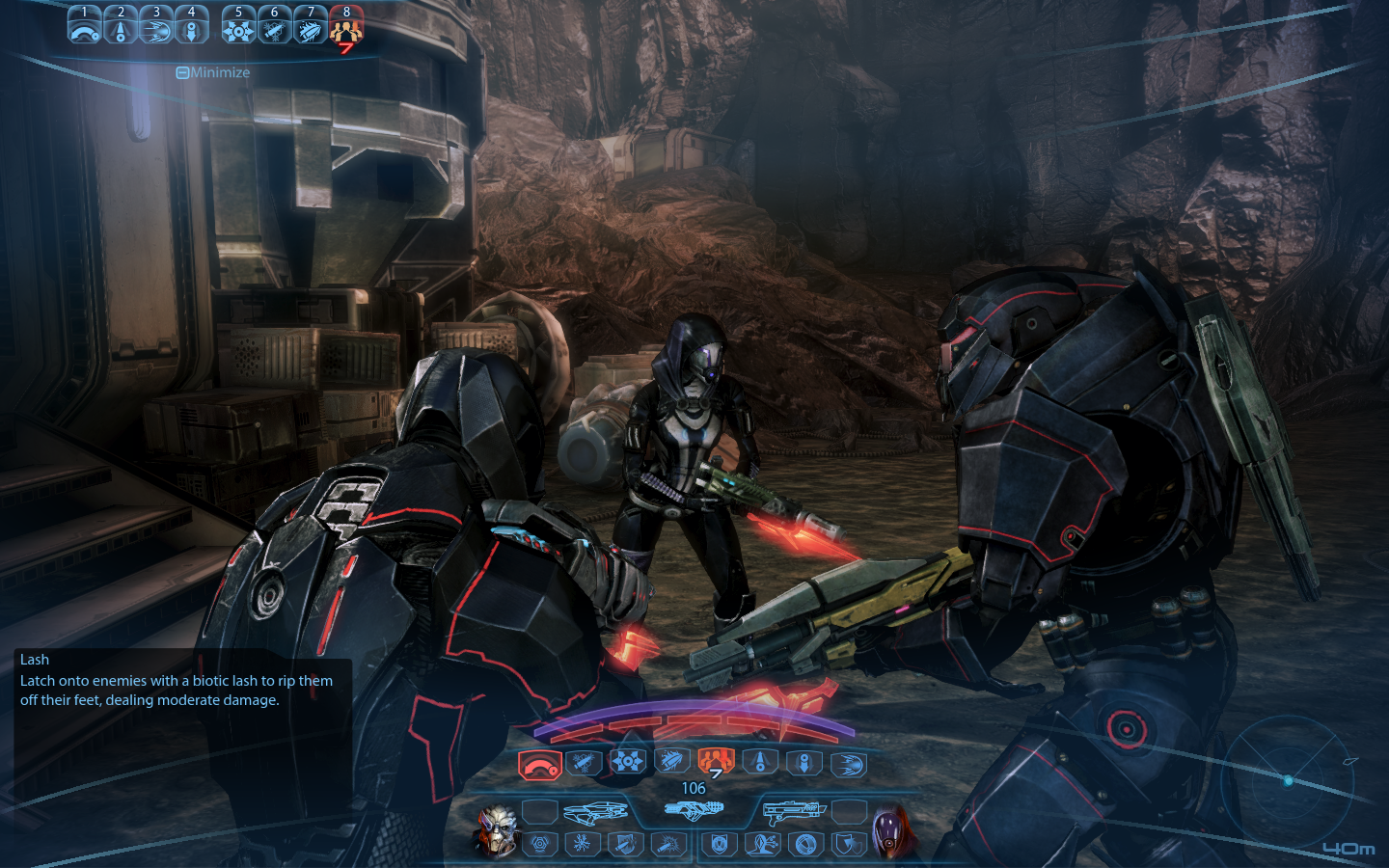
a non-diegetic HUD is a HUD that separates itself from the fiction and geometry and can adopt its own visual treatment. an example of this HUD is mass effect 3, the HUD sits on the 2D plane and the character isn't aware of the HUD unlike Dead Space where both the character and player can see the HUD

meta HUD
a meta HUD is a HUD that doesn't fit within the geometry of the game world so it instead sits on the 2D plane. an example of this is call of duty's blood splatter, this is used to indicate the amount of health the player has. it basically breaks the 4th wall

spatial
the spatial HUD is a HUD which breaks the narrative in order to give more information, but spatial HUDs manage to sit in the games geometry to help immerse the player. An example of this type of HUD is splinter cell conviction, in the beginning the player gets informed about what to do, but the main protagonist is unable to see this information

Website used to gain this information
http://www.thewanderlust.net/2010/03/29/user-interface-design-in-video-games/

from this picture that was from the website you can see that each HUD is either immersed in the game world, the games narrative, both or even none of them. each games HUD will either be different of the same as many other games, each maybe having something unique about them like metro 2033's watch and fallouts pip-boys
FMP 03/03/2015
today I finished my design for my title screen interface
this is the design that I had made
what I was going for was the starry background with the title having a moving rainbow glow, the stars are there to signify which option is selected, unlike most games where the option you are going to select has a glow around it. the main selections will have sub-menus like in most games, e.g. if you select single player then players can choose to do tournament or arcade mode.
I created the titles using title creation websites, I looked through the various choices and made a couple of various ones to see which one would suit the background
how does user interface enhance the user experience?
the user interface enhances the user experience by helping players understand. people may like different types of HUDs, people may go for the non-diegetic HUD where they can see what's going on such as health levels, mana and abilities, or maybe people may go for the Diegetic HUD where they can feel more immersed with the game and its story where they can use the HUD to progress through the game. All of this is peoples different opinions but one thing is for certain and that is that all players will be using the hud in some kind of way
links used to create the various titles (also some of the selections are on both sites)
http://www.flamingtext.co.uk/All-Logos
http://cooltext.com/
FMP 04/03/2015
today in FMP we was making sure that we would have all our work before our set deadline, there are a few things we have to do.
list of things to be handed in
today we were making the user interface as well as talking about the different types of HUDs
types of HUDs
diegetic HUD
a diegetic HUD is a HUD that exists within the game world, this means that players can interact with it in some kind of way. An example of this kind of HUD is Dead Space, the HUD is a projection in front of the players model allowing them to interact with it.

non-diegetic HUD
a non-diegetic HUD is a HUD that separates itself from the fiction and geometry and can adopt its own visual treatment. an example of this HUD is mass effect 3, the HUD sits on the 2D plane and the character isn't aware of the HUD unlike Dead Space where both the character and player can see the HUD

meta HUD
a meta HUD is a HUD that doesn't fit within the geometry of the game world so it instead sits on the 2D plane. an example of this is call of duty's blood splatter, this is used to indicate the amount of health the player has. it basically breaks the 4th wall

spatial
the spatial HUD is a HUD which breaks the narrative in order to give more information, but spatial HUDs manage to sit in the games geometry to help immerse the player. An example of this type of HUD is splinter cell conviction, in the beginning the player gets informed about what to do, but the main protagonist is unable to see this information

Website used to gain this information
http://www.thewanderlust.net/2010/03/29/user-interface-design-in-video-games/

from this picture that was from the website you can see that each HUD is either immersed in the game world, the games narrative, both or even none of them. each games HUD will either be different of the same as many other games, each maybe having something unique about them like metro 2033's watch and fallouts pip-boys
FMP 03/03/2015
today I finished my design for my title screen interface
this is the design that I had made
what I was going for was the starry background with the title having a moving rainbow glow, the stars are there to signify which option is selected, unlike most games where the option you are going to select has a glow around it. the main selections will have sub-menus like in most games, e.g. if you select single player then players can choose to do tournament or arcade mode.
I created the titles using title creation websites, I looked through the various choices and made a couple of various ones to see which one would suit the background
how does user interface enhance the user experience?
the user interface enhances the user experience by helping players understand. people may like different types of HUDs, people may go for the non-diegetic HUD where they can see what's going on such as health levels, mana and abilities, or maybe people may go for the Diegetic HUD where they can feel more immersed with the game and its story where they can use the HUD to progress through the game. All of this is peoples different opinions but one thing is for certain and that is that all players will be using the hud in some kind of way
links used to create the various titles (also some of the selections are on both sites)
http://www.flamingtext.co.uk/All-Logos
http://cooltext.com/
FMP 04/03/2015
today in FMP we was making sure that we would have all our work before our set deadline, there are a few things we have to do.
list of things to be handed in
- illustrator - crest and character
- 3d environment
- render
- dialog, sound and script
- user interface
- blog
- action plan
- crest - colors
- character - rework of the body parts
- environment - textures, making sure the animation works properly, connecting them all together
- sound - got the recording equipment booked and just need to do the voices
- blog - make sure its up to date and continue to do it
- action plan - need to start
Wednesday, 25 February 2015
FMP 23-25/02/2015
FMP 23/02/2015
today we was doing the character dialogue, preparing our accounts for the voice acting and figuring our what we would do for the audio editing, with the character dialogue I was doing all the different types of things I would have to say, these things include wining taunts, losing taunts, starting taunts and various moans and groans for attacking and getting hurt
college website used to book the equipment
creative-media.siso.co
FMP 24/02/2015
today we continued to do our character and the dialogue making sure that everything is the way it should be, as well as making sure some things that I will say will be pronounced right, don't want to be going to do the recording and forgetting how to pronounce a certain groan
FMP 25/02/2015
today we were doing more of the characters voice and tried to act out the voice a few times, I edited some dialog in my document for what the character has to say, explaining whatmost of the phrases sounded like when being said and gave some instructions on how to say some words
we also watched a video talking about character voice acting and stated the different processes
process 1
today we was doing the character dialogue, preparing our accounts for the voice acting and figuring our what we would do for the audio editing, with the character dialogue I was doing all the different types of things I would have to say, these things include wining taunts, losing taunts, starting taunts and various moans and groans for attacking and getting hurt
college website used to book the equipment
creative-media.siso.co
FMP 24/02/2015
today we continued to do our character and the dialogue making sure that everything is the way it should be, as well as making sure some things that I will say will be pronounced right, don't want to be going to do the recording and forgetting how to pronounce a certain groan
FMP 25/02/2015
today we were doing more of the characters voice and tried to act out the voice a few times, I edited some dialog in my document for what the character has to say, explaining whatmost of the phrases sounded like when being said and gave some instructions on how to say some words
we also watched a video talking about character voice acting and stated the different processes
process 1
- focus character
- less control
- less refined
- spontaneous
- fun
- focus audience
- more control
- more refined
Wednesday, 11 February 2015
FMP 09-11/02/2015
FMP 09/02/2015
today we made a shield design, based of the final concept
FMP 10/02/2015
today we started to do our characters in illustrator
the development process was far more easier when there was a template involved, I used a design I made for an older FMP lesson as a simple template and went over it in new layers, so far the body is coming along well and all it needs is a splash of color
FMP 11/02/2015
today we made a shield design, based of the final concept
FMP 10/02/2015
today we started to do our characters in illustrator
the development process was far more easier when there was a template involved, I used a design I made for an older FMP lesson as a simple template and went over it in new layers, so far the body is coming along well and all it needs is a splash of color
FMP 11/02/2015
Wednesday, 4 February 2015
FMP 02-04/02/2015
FMP 02/02/2015
today i made a quick mountain for our settings as it was something else i had to do which was fairly easy to produce but had to do different steps compared to the volcano
FMP 03/02/2015
today i made a completely new lava to fulfil the teachers need of having the texture being a certain oe and also making the lava into a polygon, as well as this i tried to find textures for mountains that i made made as well as the volcano
texture sites used
http://seamless-pixels.blogspot.co.uk/2014/07/stone-7-rock-cave-mountain-brown.html
FMP 04/02/2015
today i merged the new lava onto the volcano and messed around with some settings to try and keep it together as it flows down the volcanos side, i will update this when i get a render of the new lava
site used to find out what each part ment in the settings
http://salt-lake-services.com/services/Page.php?pid=381
today i made a quick mountain for our settings as it was something else i had to do which was fairly easy to produce but had to do different steps compared to the volcano
FMP 03/02/2015
today i made a completely new lava to fulfil the teachers need of having the texture being a certain oe and also making the lava into a polygon, as well as this i tried to find textures for mountains that i made made as well as the volcano
texture sites used
http://seamless-pixels.blogspot.co.uk/2014/07/stone-7-rock-cave-mountain-brown.html
FMP 04/02/2015
today i merged the new lava onto the volcano and messed around with some settings to try and keep it together as it flows down the volcanos side, i will update this when i get a render of the new lava
site used to find out what each part ment in the settings
http://salt-lake-services.com/services/Page.php?pid=381
Wednesday, 28 January 2015
FMP MAYA 26-28/01/2015
FMP 26/01/2015
today i did more volcano emitter and tried to improve it a bit as well as importing the volcano to mudbox and using its tools to change its look
i also used a new kind of emitter which was located in the nDynamics rather than the Dynamics, the difference between them is that the Ndynamics has more of a realistic feeling to it, as well as this i also had to make a new collide doing the following steps
today i continued to do the volcano and lava emitter with a much more fluid lava effect compared to last time, also set its initial state to the lava already being flown down the volcano
to do this you have to play the current animation to a certain part where you want it to be the new start and then do the following
today i did more volcano emitter and tried to improve it a bit as well as importing the volcano to mudbox and using its tools to change its look
i also used a new kind of emitter which was located in the nDynamics rather than the Dynamics, the difference between them is that the Ndynamics has more of a realistic feeling to it, as well as this i also had to make a new collide doing the following steps
- select the emitter and the object you want it to collide with -> nMesh -> Make passive collider
today i continued to do the volcano and lava emitter with a much more fluid lava effect compared to last time, also set its initial state to the lava already being flown down the volcano
to do this you have to play the current animation to a certain part where you want it to be the new start and then do the following
- step 1: under file and edit change the menu set from the default polygons to dynamics
- step 2: go to solvers
- step 3: go to initial state
- step 4: select set state for all dynamic
- step 5: click go to start of playback range in the bottom right hand corner
- step 6: watch as you see the animation start its animation from a new starting point
Wednesday, 21 January 2015
FMP more MAYA work 19-21/01/2015
FMP - Maya 19/01/2015
this week we divided our team projects game level into 3 parts so we had a part to model and animate, my part of the project was to do the volcano, mountains and a lava animation for the volcano
for the pain effects you have too:
this week I taught myself about emitters, I did use websites to find out how to do certain things with the emitters, it was fairly easy to understand
to make it collide you have to:
http://knowledge.autodesk.com/support/maya/learn-explore/caas/CloudHelp/cloudhelp/2015/ENU/Maya/files/GUID-0F7564E2-F46E-4559-A5FB-25518497943B-htm.html
FMP - Maya 21/01/2015
this week I continued to modify the emitter and particles and tried to add a colour to the particles, the result was alright but it was my first time using an emitter
web links
http://simplymaya.com/forum/showthread.php?s=&threadid=5601
http://simplymaya.com/forum/showthread.php?t=7688
http://www.rapidtables.com/web/color/RGB_Color.htm
http://www.digitaltutors.com/forum/showthread.php?5356-randomizing-color-(rgbPP)-on-particles
this week we divided our team projects game level into 3 parts so we had a part to model and animate, my part of the project was to do the volcano, mountains and a lava animation for the volcano
for the pain effects you have too:
- window -> general editors -> visor
- mesh output -> output quads = ticked -> modify -> convert -> paint effects to polygons
this week I taught myself about emitters, I did use websites to find out how to do certain things with the emitters, it was fairly easy to understand
to make it collide you have to:
- select the emitter and the object you want it to collide with -> Mesh -> there should be an option to collide
http://knowledge.autodesk.com/support/maya/learn-explore/caas/CloudHelp/cloudhelp/2015/ENU/Maya/files/GUID-0F7564E2-F46E-4559-A5FB-25518497943B-htm.html
FMP - Maya 21/01/2015
this week I continued to modify the emitter and particles and tried to add a colour to the particles, the result was alright but it was my first time using an emitter
web links
http://simplymaya.com/forum/showthread.php?s=&threadid=5601
http://simplymaya.com/forum/showthread.php?t=7688
http://www.rapidtables.com/web/color/RGB_Color.htm
http://www.digitaltutors.com/forum/showthread.php?5356-randomizing-color-(rgbPP)-on-particles
Wednesday, 14 January 2015
FMP MAYA refresher 12-14/01/2015
FMP MAYA refresher 12/01/2015
today in the refresher we had to make a house from a picture of a cartoon of our choice. the house I am making is the Simpsons house since the Simpsons is a cartoon and the design of the house is very good
shortcuts to remember
create -> polygon primitives -> interactive creation
interactive creation is the ability to create the shape anywhere, if this is unselected it will create a small version of the shape in the center
FMP MAYA refresher 13/01/2015
in this weeks work on Maya we learned to use paint tools and we made a small library of paint effects that we would use in our environment
shortcuts to remember
FMP MAYA refresher 14/01/2015
today we continued with the paint effect library, I had to make another for different effects that will be changed into polygons
Tubes -> Behaviour -> Turbulence
when selecting the paint effects that will be changed into polygons, in one of the mesh output areas you must select the output quads before actually converting the shape to a polygon
shortcuts to remember
- q = select tool
- w = move tool
- e = rotate tool
- r = scale tool
- alt + LMB = rotate camera
- alt + MMB = move camera
- alt + RMB = zoom camera
interactive creation is the ability to create the shape anywhere, if this is unselected it will create a small version of the shape in the center
in this weeks work on Maya we learned to use paint tools and we made a small library of paint effects that we would use in our environment
- hold B to change the brush size
- hold M to change depth of the brush
when selecting the paint effects that will be changed into polygons, in one of the mesh output areas you must select the output quads before actually converting the shape to a polygon
Wednesday, 7 January 2015
FMP 07/01/2015
FMP 07/01/2015
phase 2
the pitch presentation
what is included in the presentation?
the things in the pitch such as the character, the environment and the plot
how will the presentation be presented?
there are two way we can present it, the first is with prezi, prezi is a good website and the presentation will be presented and the other is with PowerPoint, PowerPoint is easy to use and you can make the slides just as easy as using prezi
the dope sheet
the dope sheet has the different sections of each pose, my poses were hurt and idle, we had to do the different sections of the poses and write about whats happening in the section of the poses action
overview
we presented the pitch in front of the class and the camera, I think our group did well and seeing all the other groups game ideas were quite interesting as they all had their own unique ideas. also the dope sheet went well, i managed to do the different sections in the end and i did have to retry a couple of times before that, but im happy with the final results
phase 2
the pitch presentation
what is included in the presentation?
the things in the pitch such as the character, the environment and the plot
how will the presentation be presented?
there are two way we can present it, the first is with prezi, prezi is a good website and the presentation will be presented and the other is with PowerPoint, PowerPoint is easy to use and you can make the slides just as easy as using prezi
the dope sheet
the dope sheet has the different sections of each pose, my poses were hurt and idle, we had to do the different sections of the poses and write about whats happening in the section of the poses action
overview
we presented the pitch in front of the class and the camera, I think our group did well and seeing all the other groups game ideas were quite interesting as they all had their own unique ideas. also the dope sheet went well, i managed to do the different sections in the end and i did have to retry a couple of times before that, but im happy with the final results
Subscribe to:
Comments (Atom)